Import Microsoft To Do into Todoist
Todoist imports one project at a time, from a CSV file. The Todoist export gives you a ZIP file with one CSV per To Do list, already in the shape Todoist expects.
The steps
- On the home page, sign in with Microsoft, tick your lists, choose Todoist and download the ZIP file.
- Open the ZIP: it holds one CSV file per list, named after the list (for example
Tâches.csv). - In Todoist, create one empty project per list, with the same name as the file.
- In the project, click the three dots at the top right, then Import & export → Import from CSV, and drop that list’s file.
- Todoist imports one file at a time: do the same for each list. Then open one repeating task to check that Todoist read the repeat.
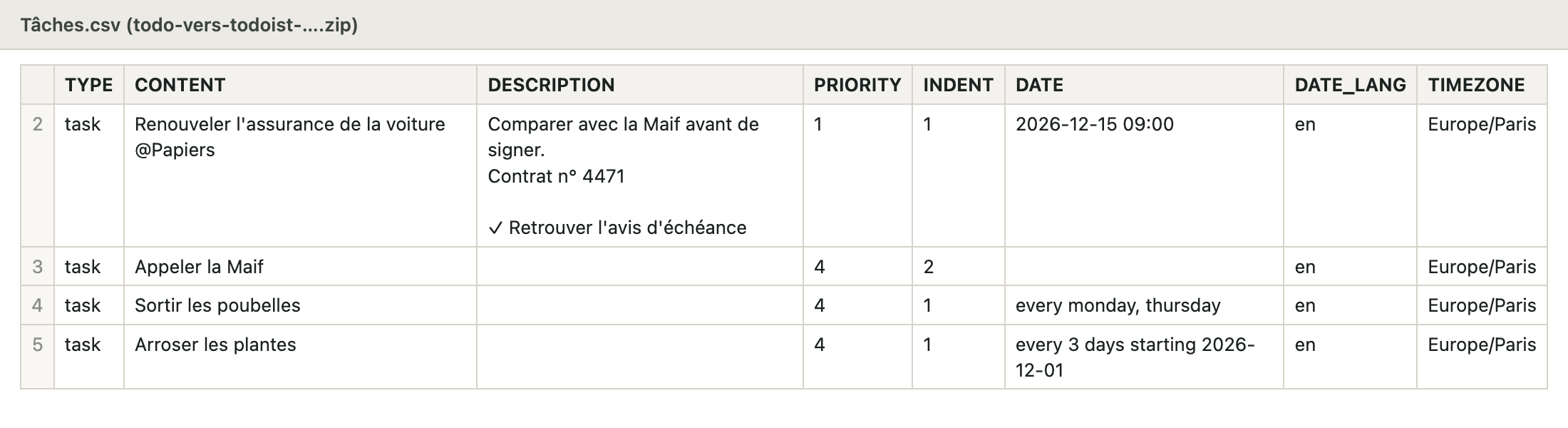
Tâches.csv from the example account, opened as a table. The step still to do becomes a sub-task (INDENT 2); the step already ticked goes into the description.What carries over, and what doesn’t
| In To Do | In Todoist |
|---|---|
| Repeats | Yes, written the way Todoist reads them (“every monday, thursday”). A repeat every 3 days keeps its start date. Checked on a real import on 27 November 2026. |
| Steps | Yes: open steps become sub-tasks; ticked steps are noted in the description. |
| Reminders | Partly: the reminder time becomes the task’s time, on its due day. Todoist does not create a separate reminder from a CSV. |
| Attachments | No: Microsoft does not hand them over. The page tells you how many tasks have one, so you can save them by hand. |
| Notes, links | Yes, in the task description. |
| Importance | Yes: an important task becomes priority 1, the others priority 4. |
| Categories | Yes, as labels (@Papiers). |
| Completed tasks | Left out by default, because Todoist would import them as open tasks. |
| List groups | No: Microsoft doesn’t hand them to other apps. Each list in a group comes as its own file; then drag the projects under a parent project in Todoist. |
| Shared lists | The tasks come across, the sharing doesn’t: invite people again in Todoist. |
Todoist takes 300 tasks per project. A longer list arrives already split into parts, Courses (1).csv then Courses (2).csv, without separating a task from its sub-tasks.
Source: Todoist’s help, Import or export a project as a CSV file (300 tasks per project, UTF-8 file, free plan included).
Other destinations
- Obsidian
One Markdown page per list.
- Notion
Pages or a database.
- TickTick
What works today.
- Spreadsheet
One row per task.
Last checked: