Import Microsoft To Do into Notion
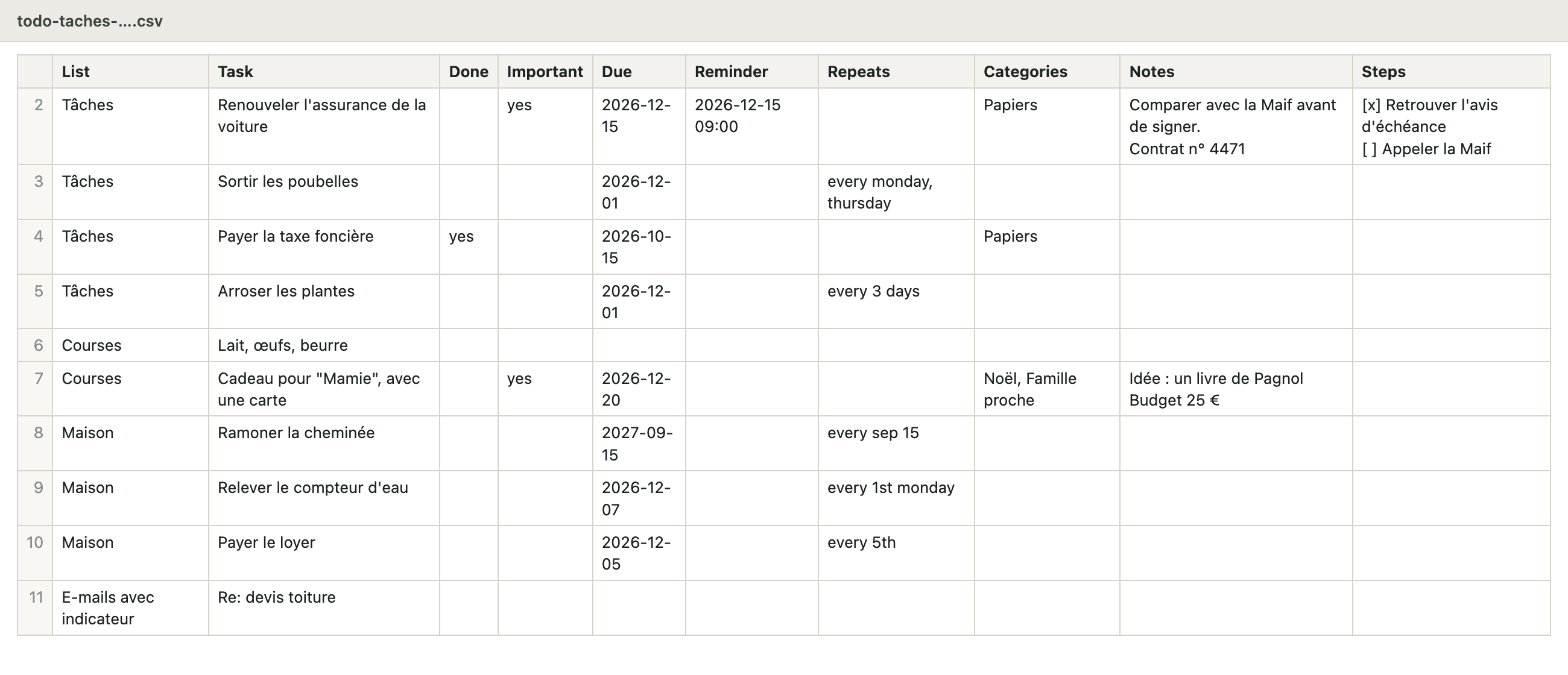
Notion has no To Do import, but it reads two formats this tool makes. Markdown gives one page per list, with a checkbox per task. The spreadsheet gives a database, with one row per task.
The steps
- On the home page, sign in with Microsoft and download either Obsidian, Notion or Markdown (pages) or Spreadsheet (a table).
- For Markdown, unzip the file: one page per list, named after the list.
- In Notion, open Settings in the sidebar, then Import. You can also type
/on a page and search for “import”. - Choose Text & Markdown for the pages, or CSV for the table, then the files. Notion makes one page per Markdown file, or one database for the CSV.
What carries over, and what doesn’t
| In To Do | Markdown pages | CSV database |
|---|---|---|
| Repeats | As text (🔁 every month on the 5th): Notion does not repeat a checkbox. | As text, in the Repeats column. |
| Steps | Yes, as checkboxes under the task. | As text, all in one cell. |
| Reminders | No | As text (date and time), with no reminder. |
| Attachments | No | No |
| Due dates | As text (📅 2026-12-15). | Yes, as a column; change its type to Date in Notion to sort by it. |
| Notes, links | Yes, under the task. | Yes, as columns. |
Notion suits keeping and re-reading your lists. For tasks that repeat, Todoist keeps the repeats, which Notion does not.
Source: Notion’s help, Import data into Notion (Text & Markdown and CSV formats, Settings → Import).
Other destinations
- Todoist
One CSV per list.
- Obsidian
One Markdown page per list.
- TickTick
What works today.
- Spreadsheet
One row per task.
Last checked: