Export Microsoft To Do to a spreadsheet
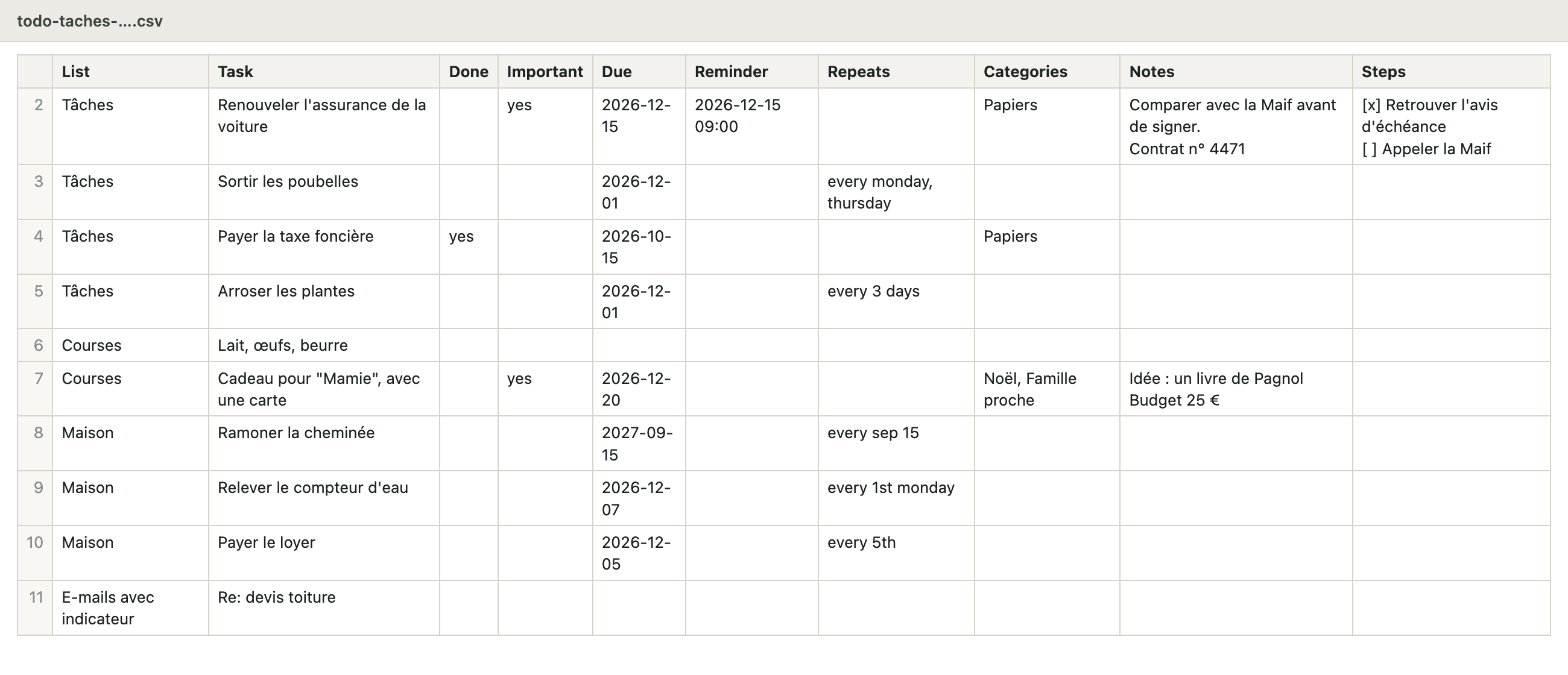
The spreadsheet keeps all your lists in a single CSV file, one row per task. Excel, Numbers, Google Sheets and LibreOffice open it, accents included.
The steps
- On the home page, sign in with Microsoft, tick your lists, choose Spreadsheet and download the CSV file.
- Double-click it to open it in Excel or Numbers. In Google Sheets: File → Import, then the file.
- Sort or filter by list, due date or importance. Completed tasks are included; untick the option before downloading if you don’t want them.
What carries over, and what doesn’t
| In To Do | In the table |
|---|---|
| Repeats | Yes, in words (“every monday, thursday”): a spreadsheet repeats nothing by itself. |
| Steps | Yes, in one cell, one per line, with [x] for the ones done. |
| Reminders | Yes, date and time in the Reminder column, with no alert. |
| Attachments | No: Microsoft does not hand them over. |
| Notes, links, categories | Yes, each in its own column. |
| Created and completed dates | Yes, in the last two columns. |
The file starts with an invisible marker (a BOM) so that Excel reads the accents. Notes over several lines stay in a single cell.
Other destinations
- Todoist
One CSV per list.
- Obsidian
One Markdown page per list.
- Notion
This table as a database.
- TickTick
What works today.
Last checked: